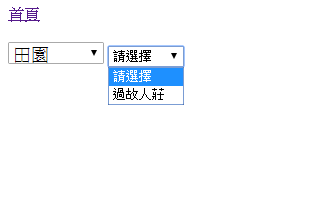
這次的筆記來寫一寫asp.net的下拉選單DropDownList的元件如何與資料表連動。第一個例子是連接資料表,第二個例子是加入第二個下拉選單(子類別)與第一個下拉選單(母類別)連動。
以下是流程:
1、加上一個asp:DropDownList 元件並連接資料表:檔名:(GridViewTestB01.aspx)
<%@ Page Language=”C#” AutoEventWireup=”true” CodeBehind=”GridViewTestB01.aspx.cs” Inherits=”Practice.a03.GridViewTestB01″ %>
<!DOCTYPE html>
<html xmlns=”http://www.w3.org/1999/xhtml”>
<head runat=”server”>
<meta http-equiv=”Content-Type” content=”text/html; charset=utf-8″/>
<title>連動下拉選單</title>
</head>
<body>
<form id=”form1″ runat=”server”>
<div>
<a href=”../Default.aspx”>首頁</a><br />
<br />
<asp:DropDownList ID=”DropDownList1″ runat=”server” style=”font-size:18px;height: 22px” DataSourceID=”SqlDataSource1″ AppendDataBoundItems=”True” DataTextField=”Class1” DataValueField=”id” AutoPostBack=”True” >
<asp:ListItem Value=”0″>請選擇</asp:ListItem>
</asp:DropDownList>
<br />
<br />
<br />
<br />
<br />
<asp:SqlDataSource ID=”SqlDataSource1″ runat=”server” ConnectionString=”<%$ ConnectionStrings:mapnoteConnectionString2014 %>” SelectCommand=”select id,class1 from mapnote.dbo.className1
“></asp:SqlDataSource>
<br />
</div>
</form>
</body>
</html>
監色的部份是較重要的部份,假設這個資料表的名稱className1有id與class1欄位,它查詢的結果在DropDownList上DataTextField會顯示Class1的值,而實際的值DataValueField則是id。
連結成功的話畫面會這麼顯示:

2、連動下拉選單:(DropDownListTest2.aspx)
這個例子是建立在上例的條件,如果要加上子類別下拉選單供查詢要如何做的問題。
2-1、連接資料表
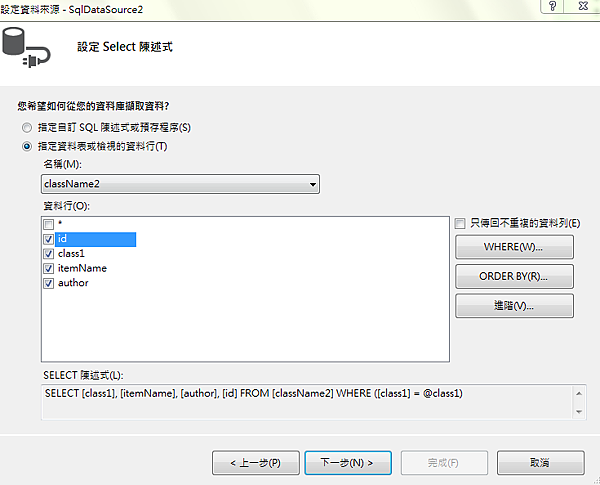
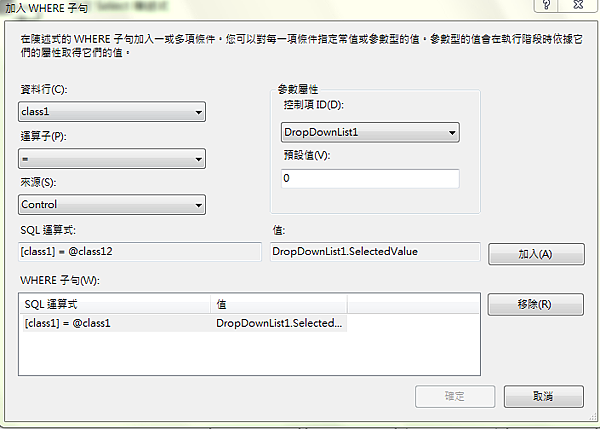
如下圖所示,這段動作的目的是把DropDownList1的選項帶入DropDownList2的查詢項
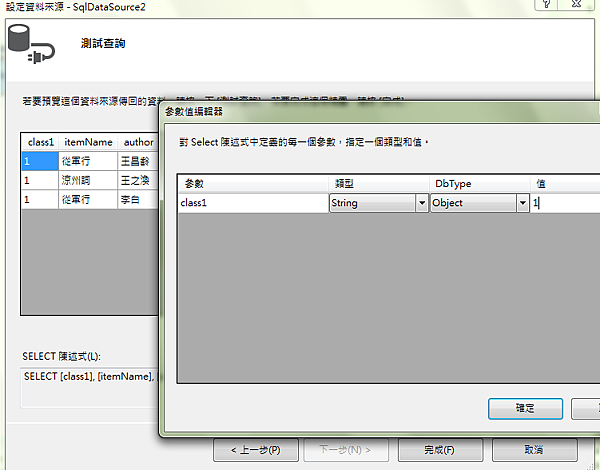
測試有值後就完成準備,如下圖:

2-2、顯示預設值
上面的畫面沒有請選擇這個初始值,在這邊進行處理。
監色的部份是預設值,橘色的部份是顯示預設值。下圖就是加上後的結果。
<asp:DropDownList ID=”DropDownList2″ runat=”server” DataSourceID=”SqlDataSource2″ DataTextField=”itemName” DataValueField=”id” AppendDataBoundItems=”True” AutoPostBack=”True” OnSelectedIndexChanged=”DropDownList2_SelectedIndexChanged”>
<asp:ListItem Value=”0″>請選擇</asp:ListItem>
</asp:DropDownList>
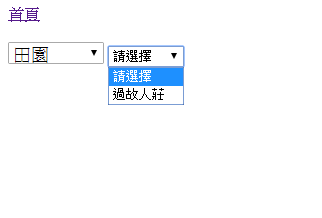
最後附上完整的程式碼如下,由於這部份還不用在.cs檔加程式,這裡只附.aspx的程式碼:
<%@ Page Language=”C#” AutoEventWireup=”true” CodeFile=”DropDownListTest2.aspx.cs” Inherits=”a03_DropDownListTest2″ %>
<!DOCTYPE html>
<html xmlns=”http://www.w3.org/1999/xhtml”>
<head id=”Head1″ runat=”server”>
<meta http-equiv=”Content-Type” content=”text/html; charset=utf-8″/>
<title>連動下拉選單</title>
</head>
<body>
<form id=”form1″ runat=”server”>
<div>
<a href=”../Default.aspx”>首頁</a><br />
<br />
<asp:DropDownList ID=”DropDownList1″ runat=”server” style=”font-size:18px;height: 22px” DataSourceID=”SqlDataSource1″ AppendDataBoundItems=”True” DataTextField=”Class1″ DataValueField=”id” AutoPostBack=”True” OnSelectedIndexChanged=”DropDownList1_SelectedIndexChanged” >
<asp:ListItem Value=”0″>請選擇</asp:ListItem>
</asp:DropDownList>
<asp:DropDownList ID=”DropDownList2″ runat=”server” DataSourceID=”SqlDataSource2″ DataTextField=”itemName” DataValueField=”id” AppendDataBoundItems=”True” AutoPostBack=”True” OnSelectedIndexChanged=”DropDownList2_SelectedIndexChanged”>
<asp:ListItem Value=”0″>請選擇</asp:ListItem>
</asp:DropDownList>
<br />
<br />
<br />
<br />
<br />
<asp:SqlDataSource ID=”SqlDataSource1″ runat=”server” ConnectionString=”<%$ ConnectionStrings:mapnoteConnectionString2014 %>” SelectCommand=”select id,class1 from mapnote.dbo.className1
“></asp:SqlDataSource>
<asp:SqlDataSource ID=”SqlDataSource2″ runat=”server” ConnectionString=”<%$ ConnectionStrings:mapnoteConnectionString2014 %>” SelectCommand=”SELECT [class1], [itemName], [author], [id] FROM [className2] WHERE ([class1] = @class1)“>
<SelectParameters>
<asp:ControlParameter ControlID=”DropDownList1″ DefaultValue=”0″ Name=”class1″ PropertyName=”SelectedValue” Type=”String” />
</SelectParameters>
</asp:SqlDataSource>
<br />
</div>
</form>
</body>
</html>
—
註:DropDownList這個元件會殘留前次查詢,因此在要DropDownList1選擇的時候先清除DropDownList2的值,要在以下的函式加上下列語法:
protected void DropDownList1_SelectedIndexChanged(object sender, EventArgs e)
{
DropDownList2.Items.Clear(); //清除內容
DropDownList2.Items.Add(“請選擇”);//加第一行內容
}
—